Online payments
Choose your online payment flow based on your checkout needs:
- Standard - Traditional flow where customers complete payment after reviewing their cart
- Express - Streamlined one-click checkout with shipping selection in the app
Ready to build?
Use the ePayment API to implement either online payment flow.
- Standard
- Express ⭐
Standard online payment
The customer selects items in your e-commerce store, clicks checkout, and completes payment in the Vipps MobilePay app.
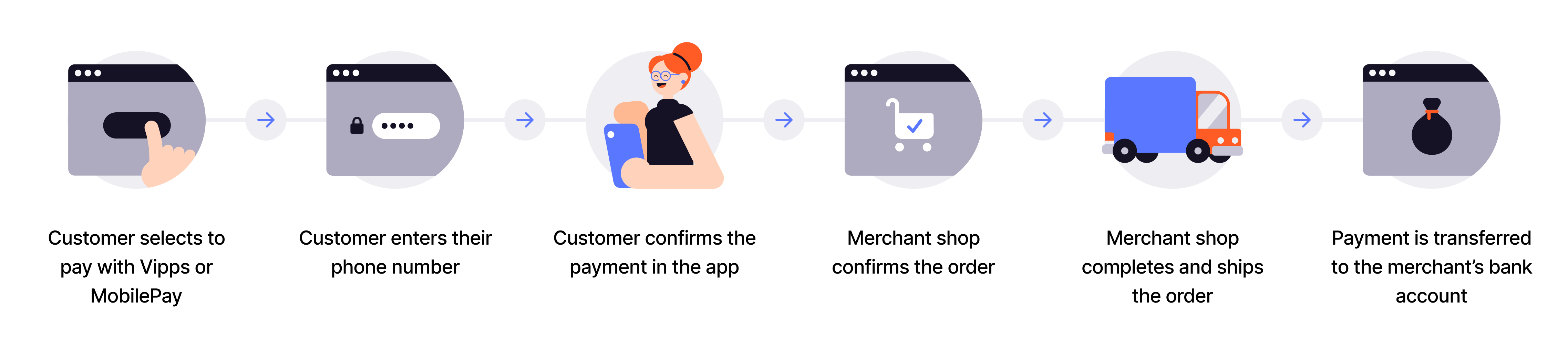
Flow diagram: 6-step online payment process. (1) Customer selects to pay with Vipps or MobilePay. (2) Customer enters their phone number. (3) Customer confirms the payment in the app. (4) Merchant shop confirms the order. (5) Merchant shop completes and ships the order. (6) Payment is transferred to the merchant's bank account.
- Add products to order - Customer selects items in your online store.
- Send payment request - Initiate payment using the ePayment API with
WEB_REDIRECT. - Open the app or payment dialog - The Widget SDK switches to the Vipps MobilePay app on mobile and tablet, or opens a payment dialog with the landing page on desktop.
- Customer authorizes - Customer approves payment in their app.
- Provide confirmation - Display order confirmation to customer.
- Prepare the order - Pack the goods and make them ready to dispatch.
- Capture payment - Capture the payment and confirm that the full amount was captured.
- Ship the order - Hand the goods to the carrier only after the capture is confirmed.
View sequence diagram
Standard online payment flow
- Customer selects to pay with Vipps or MobilePay.
- Merchant initiates a payment request via the ePayment API.
- ePayment API returns a redirectUrl and payment reference to the merchant.
- Merchant handles the app switch with the redirectUrl. We recommend using the Widget SDK for this.
- ePayment API requests the payment in the customer's Vipps or MobilePay app.
- Customer selects a card and clicks pay.
- Webhooks API sends the merchant an authorized, aborted, or expired event.
- Merchant gets the payment from the ePayment API, as a backup if the webhook is delayed or missed.
- ePayment API returns the current state of the payment.
- If the payment was aborted or expired, the customer is returned to the checkout page and the flow ends.
- If the payment was authorized, the merchant displays order confirmation to the customer.
- Merchant prepares the order (packs goods, makes ready to dispatch).
- Merchant captures the payment via the ePayment API.
- ePayment API returns a response with the captured amount.
- Merchant verifies the captured amount matches expected before shipping.
- Merchant ships the order (only after full capture is verified).
Express online payment
Streamline your checkout process by letting customers select shipping options and confirm delivery details directly within the Vipps MobilePay app.
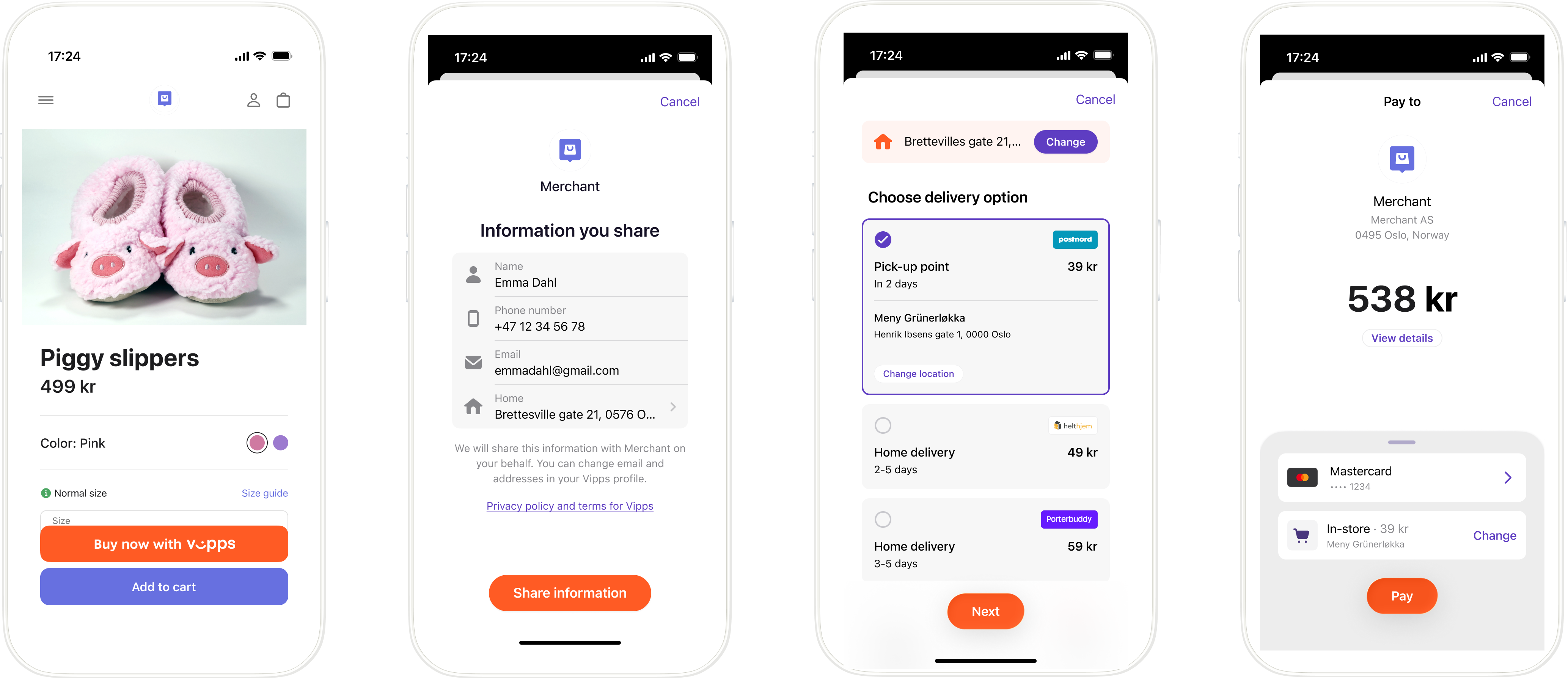
Screenshot: 4-step Vipps Express flow. (1) Product page with 'Buy now with Vipps' button. (2) 'Information you share' screen showing name, phone, email, and address with a 'Share information' button. (3) Delivery options screen showing pick-up point and home delivery choices. (4) Payment summary showing amount with card and delivery selection.
- Customer clicks Express - Customer clicks the Express button on your product or checkout page.
- Initiate Express payment - Create payment with shipping options using the ePayment API.
- Open the app or payment dialog - The Widget SDK switches to the Vipps MobilePay app on mobile and tablet, or opens a payment dialog with the landing page on desktop.
- Customer consents - Customer approves sharing their name, address, phone, and email.
- Customer selects shipping - Customer chooses their preferred shipping option in the app.
- Customer authorizes - Customer confirms the final payment amount (including shipping).
- Prepare the order - Pack the goods and make them ready to dispatch.
- Capture payment - Capture the payment and confirm
HTTP 200 OK. - Ship the order - Hand the goods to the carrier only after the capture is confirmed.
View sequence diagram
Express flow
- Customer clicks the Express button.
- Merchant creates an Express payment via the ePayment API with the wallet payment method and shipping options.
- ePayment API returns a redirectUrl and payment reference to the merchant.
- Merchant handles the app switch with the redirectUrl. We recommend using the Widget SDK for this.
- ePayment API requests the payment in the customer's Vipps or MobilePay app.
- Customer shares their address, selects a shipping option, and confirms the total amount.
- Webhooks API sends the merchant an authorized, aborted, or expired event.
- Merchant gets the payment from the ePayment API, as a backup if the webhook is delayed or missed.
- ePayment API returns the current state of the payment, including the shipping details and the user details.
- If the payment was aborted or expired, the merchant returns the customer to the page they started from, and the flow ends.
- If the payment was authorized, the merchant displays order confirmation to the customer.
- Merchant prepares the order (packs goods, makes ready to dispatch).
- Merchant captures the payment via the ePayment API.
- ePayment API returns a response with the captured amount.
- Merchant verifies the captured amount matches expected before shipping.
- Merchant ships the order (only after full capture is verified).
For a detailed sequence diagram, see Express API guide: Sequence diagram.
Implementation resources
Start with the ePayment API overview or use the links for your selected flow.
Standard:
- How ePayment works online - Step-by-step walkthrough of the standard online payment flow
- Create payment - Reference for creating a payment
- Widget SDK - Renders the pay button that either switches to the app or opens the payment dialog that provides the landing page
- Landing page - What the customer sees when paying on desktop, and how to customize it
Express:
- How Express works - Visual walkthrough of the customer experience
- Express feature documentation - Complete implementation guide with API specifications
- Widget SDK - Renders the Express button and starts the payment